
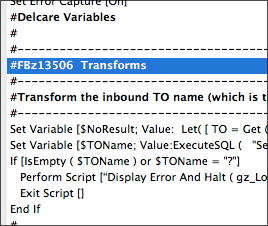
 We’ve started including FogBugz case numbers in our script comments. This lets us move between FBz and FileMaker pretty quickly: from FBz we can easily search* the scripts in FileMaker for the case number, landing right where we might need to make a change, and from FileMaker we can quickly paste the case number into FBz to see what someone’s question was, or what issue was resolved.
*Another place where script search has become part of the daily workflow.

7 Comments
Are you using just FogBugz, or FogBugz with Kiln? Does this mean you are using a FileMaker-specific method of Software Configuration management and version control? I’d like to know more, please.
Hey Scott, sorry I missed this! No, we’re not using Kiln, but we need to start. We’ll probably just grab the binaries and not try to do anything with DDRs or text. (FMI really needs to let us rebuild a file from the DDR.)
Great technique! 😉 I’m definitely a fan of referencing case/ticket/feature IDs in comments. Even in calc comments. So – much better now that we have 2empowerFM. If you had a consistent comment convention you could get fancy and parse out data from DDRs or other tools. Maybe even start to automate some reporting based on ID / script, etc… But just a search on scripts by case# is super helpful.
That’s cool. I just presented at the UK Technet on getting FM to talk to both FogBugz to report bugs when scripts break and and Trello as a way of getting user suggestions onto my to do list
I think that is actually Todd, getting me back for “paranaters”
Ouch! So, you admit that you can’t spell?
You coming to DevCon in Miami, John?
– – “Scott”
I hope you don’t ever search for “Declare Variables”, because you spelled it “Delcare…” in your script!