

Shot of tequila and a lei at the bar, Hualalai, 10/5/2011
Shot of tequila and a lei at the bar, Hualalai, 10/5/2011

FileMaker and Supabase We are very excited to be supporting Supabase as a datasource for DayBack Calendar. You can embed DayBack in your Supabase project, or see Supabase records alongside your FileMaker events in DayBack.
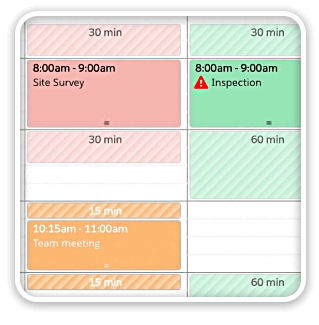
Buffers in DayBack let you define padding before and after your events so you can see the time you need, not just the time you booked. Instead of squeezing appointments into every available minute, your calendar starts to reflect the reality of how your day unfolds. Buffers is ideal for travel time,
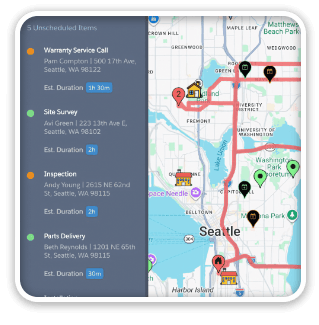
See When Assets are Passing by Unscheduled Jobs Showing unscheduled items on the map lets you see when a route is passing close to jobs you need to schedule. As you click on each truck, you’ll see it’s route for the day and find unscheduled jobs that would be good
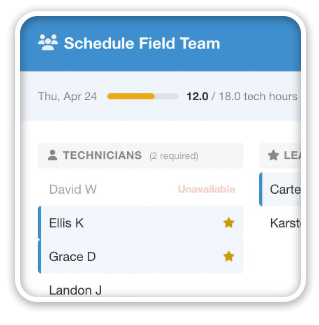
Seeing Availability at a Glance We recently customized DayBack for a customer who wanted to consolidates all the decisions of team assignments into a single screen. When a dispatcher clicks on a job, they can schedule the entire field team (technicians, lead, vehicle, departure plan, and equipment) without leaving the
3 Comments
Yesterday was one of the saddest days I’ve experienced in quite a few years. Steve’s brilliance and contribution to this world will be missed by countless millions around the world. He enriched all our lives with vision and determination few, if any, will ever surpass.
He enriched mine every day. Rest easy – you deserve it.
I felt very sad as well and this sadness is a pause to reflect on how grateful that I am for Steve’s creativity and love have gone into Apple and the innovations that are a part of our daily lives.
I would say he IS enriching our lives Right Now as millions are using these amazing tools born of this creative inspiration.
This enrichment is still growing as so much loving creative inspiration IS continuing to grow out of what has come through Steve Jobs.
We are appreciating these gifts now. Enjoy, create, and share your love and passion in the work you are doing.
Enjoy yourself over there, John. See when you get back.