
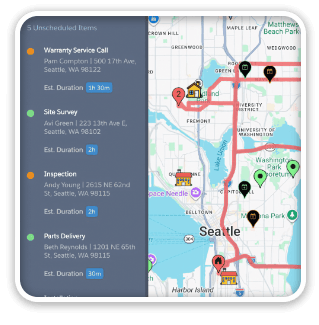
We’ve simplified GoMaps to work on desktop versions of FileMaker Pro solutions and named it ProMaps. The relationship graph got dead simple so you can paste the map right on to your existing layouts. (And the map is scriptable, so once you click on a pin, you can run your own scripts from the property detail within the map.)
ProMaps is completely unlocked for you to modify and extend.

And if you need both GoMaps and ProMaps, you can save $100 with our Maps Bundle.
Download the demo and check it out.

7 Comments
Will this product import the mile or KM distances
Hi Brendan, Not sure if “import” is really what you mean, but ProMaps doesn’t do anything with distances out of the box. Once ProMaps has geocoded your records, however (derived their Latitude and Longitude), you can calc the distance between two records. Ping support at seedcode.com if you’d like more info on that. =)
What about google limits? is there provision for an API key? or how is this handled?
c
Hi Charles, you can add your own API key if you need one. Details are in our docs here: http://www.seedcode.com/pmwiki/pmwiki.php?n=GoMaps.GoogleAPI
Hi Martha,
No it doesn’t do any clustering currently. There are some issues there because really the only way to effectively add this feature is to have it automatically cluster. Although maybe the ability to toggle that on and off isn’t such a bad idea. I will count this as one vote for a clustering feature 🙂
Thanks,
Tanner
🙂 Thanks, Tanner! Even without the clustering, it’s a wonderful product – Kudos!
Very cool! Does this use the MarkerCluster API to group together pins while zooming?