ProMaps Custom Icons and Pins

Using a different icon and pin colors on your map is a great way to visualize found sets. Fortunately, ProMaps for FileMaker makes it easy to assign different icons based on different values in your fields. Sometimes, though, you may want to create icons and color combinations on the fly.

Brian Ouimette and Jonathan Sherry at Full City Consulting have come up with a great looking icon selector for ProMaps. This allows them to create markers, set a color, then choose between a pin icon or truck icon, and the marker image will be automatically rendered by their scripts.

To make this happen, their FileMaker scripts perform the following steps:

  • Custom JavaScript code is loaded in a new web viewer
  • That code is passed preset SVG shape data
  • The JavaScript code converts that SVG shape data into a PNG based on the selected color
  • That new PNG image is passed back as a parameter in a FileMaker script using the FMP URL protocol, just like ProMaps and DayBack
  • The image is then saved into the marker’s container field in ProMaps

While the scripting is a bit complicated, the end result is really easy for schedulers:
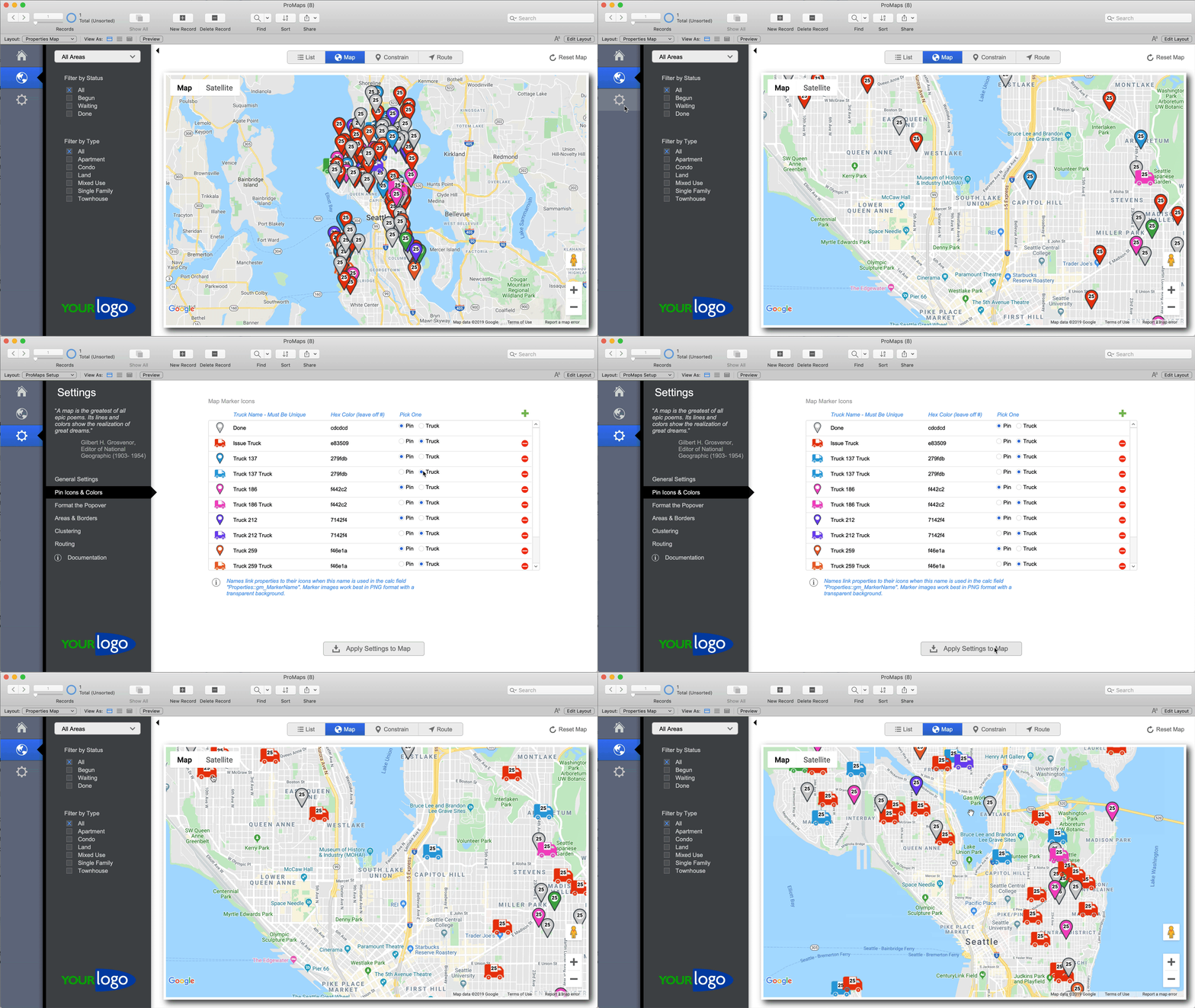
Thanks, Brian and Jonathan for putting together this great example!

(For more on creating icons on the fly, checkout using the Google API to generate pins.)

Featured Posts

Follow Along

Stay up to date with the latest news & examples from SeedCode

Leave a Reply

Your email address will not be published. Required fields are marked *

Check out some of our other posts ...

DayBack for Supabase

FileMaker and Supabase We are very excited to be supporting Supabase as a datasource for DayBack Calendar. You can embed DayBack in your Supabase project, or see Supabase records alongside your FileMaker events in DayBack.

Read More »

Visual Buffers: a More Accurate Calendar

Buffers in DayBack let you define padding before and after your events so you can see the time you need, not just the time you booked. Instead of squeezing appointments into every available minute, your calendar starts to reflect the reality of how your day unfolds. Buffers is ideal for travel time,

Read More »

Add Jobs to a Mapped Route in FileMaker

See When Assets are Passing by Unscheduled Jobs Showing unscheduled items on the map lets you see when a route is passing close to jobs you need to schedule. As you click on each truck, you’ll see it’s route for the day and find unscheduled jobs that would be good

Read More »

Scheduling Teams and Equipment

Seeing Availability at a Glance We recently customized DayBack for a customer who wanted to consolidates all the decisions of team assignments into a single screen. When a dispatcher clicks on a job, they can schedule the entire field team (technicians, lead, vehicle, departure plan, and equipment) without leaving the

Read More »

FOLLOW ALONG

Stay up to date with the latest news & examples from SeedCode

© 2026 SeedCode, Inc.