
Blog & Latest News

  • All
  • Analytics
  • Berlin
  • Calendar
  • DevCon 2015
  • DevCon 2019
  • FileMaker
  • FileMaker 12
  • FileMaker 13
  • FileMaker 16
  • FileMaker 19
  • FileMaker Go
  • FileMaker Go Best Practices
  • FileMaker SQL
  • Games
  • Gmail
  • GoZync
  • HTML5
  • iCal
  • Interface Design
  • javascript
  • JSON
  • Making Time
  • Maps
  • Pause
  • PauseOnError
  • Resource Scheduling
  • Salesforce
  • seedcode
  • SeedCode Complete
  • Sidebar
  • WebDirect
  • What Works
Visual Buffers: a More Accurate Calendar

August 4, 2026

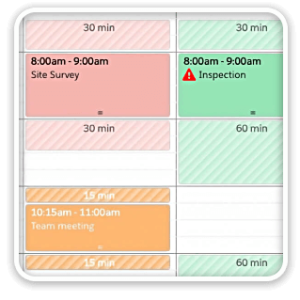
Buffers in DayBack let you define padding before and after your events so you can see the time you need, not just the time you booked. Instead of squeezing appointments into every available minute, your calendar starts to reflect the reality of how your day unfolds. Buffers is ideal for travel time, charting, or cleaning between procedures. Add buffers to your DayBack by downloading the app-actions and following the instructions...

Scheduling Teams and Equipment

June 16, 2026

Seeing Availability at a Glance We recently customized DayBack for a customer who wanted to consolidates all the decisions of team assignments into a single screen. When a dispatcher clicks on a job, they can schedule the entire field team (technicians, lead, vehicle, departure plan, and equipment) without leaving the calendar.

Schedule Crews in FileMaker

November 9, 2025

We often see folks struggling to schedule both crew membership and crew assignment. This is particularly tough if crew membership can change with the different roles required on different jobs. The interface below helps a great deal. You can see the crew leads, with red icons, and the crew members below them. Note how the second day of electrical work has Pat leading different crew members. You can...

Live Validation and Dynamic Forms in Your Calendar

October 20, 2025

Rather than wait for validation until an appointment is submitted, DayBack can show validation inline while users are completing an entry in the calendar. Then, instead of running into FileMaker validation errors one-at-a-time, DayBack can surface all the places where an event may be out of bounds, and even rank those issues by severity: All of this is made possible by DayBack’s custom event actions that let developers...

Improved Resource Selection

May 1, 2024

We’ve made some big changes to how you filter and assign resources when editing events in DayBack. These changes will make it much easier to work with large numbers of resources, especially for folks assigning multiple resources to the same event. Watch a video of the new behaviors and learn more here: Adding Multiple Resources to an Item. If you haven’t looked at your resource field mapping in...

Suggesting Appointment Slots

March 12, 2024

Show Available Slots that Match Multiple Criteria Schedulers often look for gaps in their schedules to find the open resources for each opportunity. But sometimes, gaps don’t tell the whole story. You may have invisible criteria like skill-matching, cleaning requirements, or multiple resources to schedule at once. Or you may be on the phone with an opportunity and must suggest available times as quickly as possible. In these...

New Longer Timescales for DayBack

December 19, 2023

Resource Scheduling Swimlanes You can now extend the pivoted scheduling view in DayBack to show items by week instead of solely by day. This lets the swimlanes in your schedule present your resource allocations for up to 23 weeks at a time (almost six months). In the screenshot above, most installation and training appointments take a whole week to complete. But a few items just take a few...

Prev
123

Featured Posts

Follow Along

Stay up to date with the latest news & examples from SeedCode

FOLLOW ALONG

Stay up to date with the latest news & examples from SeedCode

© 2026 SeedCode, Inc.