

September 14, 2026
FileMaker and Supabase We are very excited to be supporting Supabase as a datasource for DayBack Calendar. You can embed DayBack in your Supabase project, or see Supabase records alongside your FileMaker events in DayBack.
FileMaker and Supabase We are very excited to be supporting Supabase as a datasource for DayBack Calendar. You can embed DayBack in your Supabase project, or see Supabase records alongside your FileMaker events in DayBack.
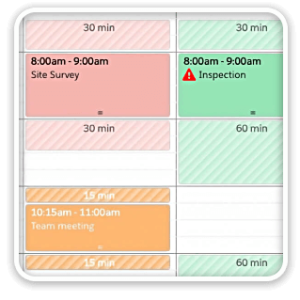
Buffers in DayBack let you define padding before and after your events so you can see the time you need, not just the time you booked. Instead of squeezing appointments into every available minute, your calendar starts to reflect the reality of how your day unfolds. Buffers is ideal for travel time, charting, or cleaning between procedures. Add buffers to your DayBack by downloading the app-actions and following the instructions...

See When Assets are Passing by Unscheduled Jobs Showing unscheduled items on the map lets you see when a route is passing close to jobs you need to schedule. As you click on each truck, you’ll see it’s route for the day and find unscheduled jobs that would be good candidate for joining that route.

Seeing Availability at a Glance We recently customized DayBack for a customer who wanted to consolidates all the decisions of team assignments into a single screen. When a dispatcher clicks on a job, they can schedule the entire field team (technicians, lead, vehicle, departure plan, and equipment) without leaving the calendar.

A number of customers have repurposed the unscheduled sidebar in DayBack as a waitlist. Schedulers can drag eligible appointments from the sidebar into their schedule when there are cancellations.

We often see folks struggling to schedule both crew membership and crew assignment. This is particularly tough if crew membership can change with the different roles required on different jobs. The interface below helps a great deal. You can see the crew leads, with red icons, and the crew members below them. Note how the second day of electrical work has Pat leading different crew members. You can...

Rather than wait for validation until an appointment is submitted, DayBack can show validation inline while users are completing an entry in the calendar. Then, instead of running into FileMaker validation errors one-at-a-time, DayBack can surface all the places where an event may be out of bounds, and even rank those issues by severity: All of this is made possible by DayBack’s custom event actions that let developers...

We usually think of “optimizing” a route as finding the best turn-by-turn instructions for the locations assigned to that route. But your best chance of creating an efficient route comes earlier in the process: assigning a location to the best route makes the biggest impact. The core mapping action in DayBack now recognizes multi-select in the calendar. This means you can select a series of items and route them to various resources...

Maps, Drive Times, and Distances are Now Integrated into DayBack Calendar for FileMaker DayBack has long offered route and drive time calculations using custom actions. Creating and customizing them is now much easier, thanks to the new map. A new, interactive map is built into the calendar as a parallel view of your schedule, so you can edit times and assignments in either view and see your changes...

Use DayBack’s resource views to break out your schedule by project instead of by resource. When you’ve organized your scheduling by project, you’ll see your capacity differently and may be able to make better decisions when allocating your team. Learn more and see this in action on the DayBack blog: Toggle Between People and Projects.